Food Cost Calculator
Enter a plate cost and menu price, or your inventory and sales, to get the food cost percentage and a menu price.
The food cost calculator shows what share of a menu price goes on food. You can work out the food cost percentage for one dish, find the menu price needed for a target food cost, or measure food cost for a week or month from your stock counts and purchases. It is a free menu pricing calculator that runs entirely in your browser. No sign-up is needed, and nothing you type is uploaded.
It suits restaurant owners, chefs and anyone figuring food cost for a small kitchen or catering job. Enter your own numbers, and the tool returns food cost %, menu price, gross profit and related figures, along with the steps used to get them. The results are only as accurate as your inputs, so check recipe costs and supplier invoices before you set prices.
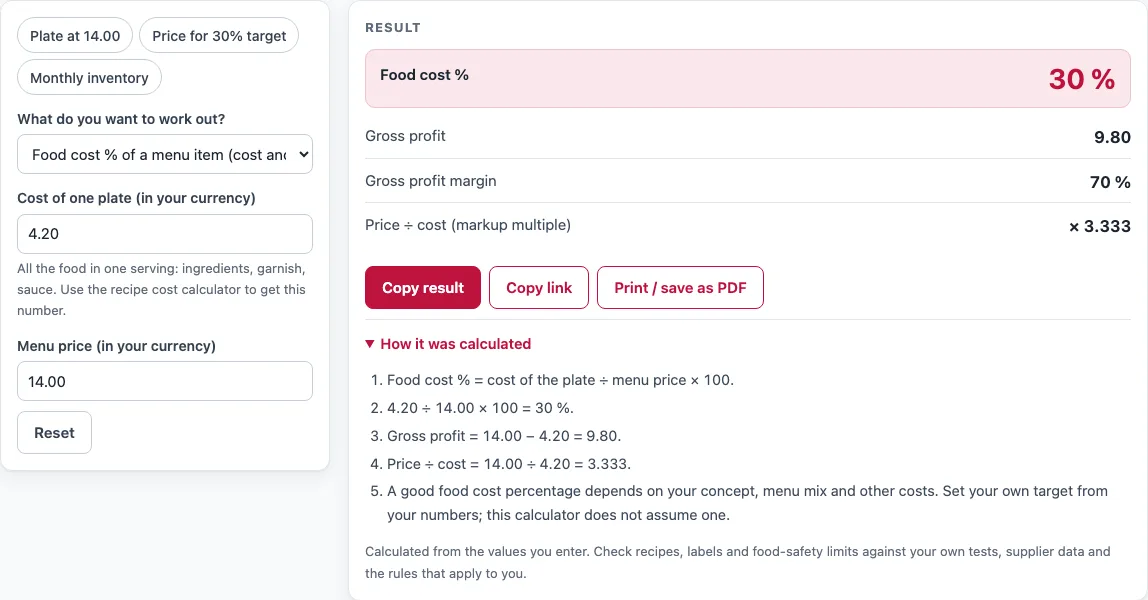
How to use the Food cost calculator
- Open “What do you want to work out?” and choose one of three options: food cost % of a menu item, menu price from a target food cost %, or food cost % for a week or month (inventory method).
- For a menu item or a target price, type the cost of one plate in your currency: all the food in one serving, including garnish and sauce. If you do not have it yet, the help text points to the recipe cost calculator.
- For a menu item, type the menu price in your currency.
- For a target price, type the target food cost as a percentage. The choice is yours.
- For a period, type the beginning inventory, the purchases during the period, the ending inventory and the food sales. Leave out drinks, tax and tips from food sales.
- Read the result. The rows depend on the option you chose and can include Food cost %, Menu price, Cost of goods used (COGS), Gross profit, Gross profit margin and Price ÷ cost.
- Read any warning above the result before you use the numbers.
Three example buttons fill in sample values: Plate at 14.00, Price for 30% target and Monthly inventory. Under the result, “Copy result” copies the result lines, and “Copy link” copies a page address that holds every input. “Print / save as PDF” prints the inputs, results, steps and date. “Reset” restores the defaults.
What is the food cost formula?
The food cost formula divides the cost of the ingredients in a dish by its menu price and multiplies by 100. In short: Food cost % = cost of the plate ÷ menu price × 100. This food cost percentage formula gives the share of the price that pays for food.
For example, a plate that costs 4.20 to make and sells for 14.00 has a food cost of 4.20 ÷ 14.00 × 100 = 30 %. The remaining 70 % of the price covers labor, rent, other costs and profit. Gross profit per plate is the price minus the plate cost: 14.00 − 4.20 = 9.80.
You can turn the formula around to find the menu price for a target. Menu price = plate cost ÷ target %. With a plate cost of 4.20 and a 30 % target, 4.20 ÷ 0.30 = 14.00. The target is a business decision. The tool does not assume an industry figure, and a suitable level depends on your concept, menu mix and other costs.
How do I calculate food cost percentage over a period?
Use the inventory method when you want the food cost for a whole week or month. Add the beginning inventory and the purchases, then subtract the ending inventory. This gives the cost of goods used. Divide that by food sales and multiply by 100: (beginning inventory + purchases − ending inventory) ÷ food sales × 100.
Take a month with beginning stock of 8,200, purchases of 14,350, ending stock of 7,900 and food sales of 52,000. The cost of goods used is 8,200 + 14,350 − 7,900 = 14,650. The food cost is 14,650 ÷ 52,000 × 100 = 28.17 %.
Count stock the same way at the start and end of the period. If the two counts are made differently, the result will not compare fairly with earlier months.
Sources
- Food cost % = cost of food ÷ sales × 100; cost of goods sold = opening inventory + purchases − closing inventory (standard restaurant accounting definitions)
Worked examples
| Input | Result |
|---|---|
| plate cost 4.20, menu price 14.00 | food cost 30 %, gross profit 9.80 per plate |
| plate cost 3.60, menu price 12.00 | food cost 30 %, gross profit 8.40 per plate |
| plate cost 2.15, target 28 % | menu price 7.68 |
| plate cost 0.85, target 25 % | menu price 3.40 |
| beginning inventory 8200, purchases 14350, ending inventory 7900, food sales 52000 | cost of goods used 14,650.00, food cost 28.17 % |
| beginning inventory 3100, purchases 5400, ending inventory 2850, food sales 19800 | cost of goods used 5,650.00, food cost 28.54 % |
Calculated by the tool above with these values.
Frequently asked questions
What is a good food cost percentage?
There is no single right figure. The tool does not assume a target, because a good level depends on your concept, menu mix and other costs. Set your target from your own numbers.
Is the calculator free, and is anything I type uploaded?
Yes. The calculator is free, needs no sign-up and runs entirely in your browser. Nothing you type is uploaded.
Can I use the results in commercial work such as quotes and bids?
Yes. Results, including numbers, steps, printouts and labels, can be used in any work, including commercial work such as product labels, packaging, menus, recipes and costing sheets. No attribution is needed. You are responsible for accurate inputs and for following the rules that apply to you.
Why does the tool warn that ending inventory is 0?
If you started the period with stock but entered 0 at the end, the ending figure may be missing. If you did not count stock, the food cost will look too high. Count your stock before you rely on the result.
Why does the tool warn that the food costs more than it is sold for?
A food cost above 100 % means the food costs more than the price it sells for. Check your inputs first, especially the plate cost and the menu price, for typing mistakes.
Related tools
- Recipe cost calculator: use it to work out the cost of one plate before you enter it here.
- Recipe scaling calculator: use it when you change a batch size and need the ingredient amounts for the new yield.
- Nutrition label generator: use it when you need a nutrition panel for a packaged product.
- All calculators: browse the full list when you need a different tool.