Original Gravity Calculator (Hydrometer Tools)
Correct a hydrometer reading for temperature, work out how much water to add or boil off to reach a target gravity, or get the original gravity from ABV and FG.
This original gravity calculator is a set of hydrometer tools for brewers, cider makers and winemakers. It corrects a hydrometer reading taken at a temperature other than the one your hydrometer was calibrated for. It shows how much water to add or boil off to reach a target gravity, and what gravity you get after a volume change. It can also find the original gravity (OG) from your alcohol by volume (ABV) and final gravity (FG).
The calculator runs in your browser. It is free and needs no sign-up. Results are estimates, so use them as a guide for planning your batch, not as a replacement for measuring.
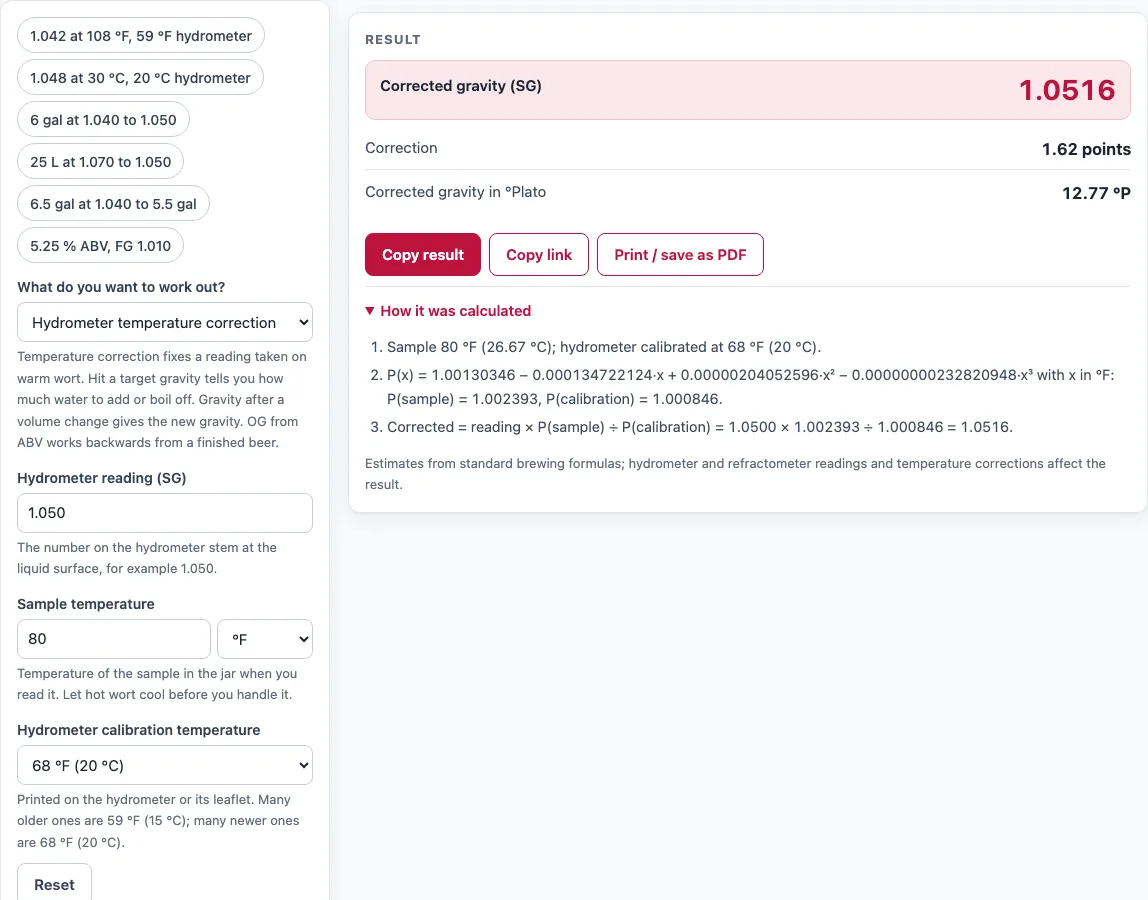
How to use the Hydrometer Calculator
- Open the ‘What do you want to work out?’ menu and choose a mode: ‘Hydrometer temperature correction’, ‘Hit a target gravity: water to add or boil off’, ‘Gravity after a volume change’ or ‘OG from ABV and FG’.
- For temperature correction, type your ‘Hydrometer reading (SG)’ (0.980 to 1.200).
- Enter the ‘Sample temperature’ in °F or °C.
- Choose your ‘Hydrometer calibration temperature’: 59 °F (15 °C), 60 °F (15.6 °C) or 68 °F (20 °C).
- Read ‘Corrected gravity (SG)’, ‘Correction’ and ‘Corrected gravity in °Plato’.
- For target gravity, enter ‘Current wort volume’, ‘Current gravity’ and ‘Target gravity’, then pick a ‘Gravity unit’ (SG or °Plato).
- Read ‘Water to add’ or ‘Volume to boil off’. ‘Volume at the target gravity’ shows the final volume.
- For a volume change, enter ‘Current wort volume’, ‘Current gravity’ and ‘New volume’, then read ‘New gravity (SG)’.
- For OG from ABV and FG, enter ‘Alcohol by volume (ABV, %)’ (0 to 25) and ‘Final gravity (FG, SG)’, then read ‘Original gravity (OG, SG)’.
- Open ‘How it was calculated’ to see each step worked with your numbers.
Preset buttons fill in worked examples. ‘Copy link’ keeps all your inputs, ‘Copy result’ copies the answer, and ‘Print / save as PDF’ prints your inputs, results, steps and the date. ‘Reset’ clears the form.
How do I correct a hydrometer reading for temperature?
Multiply your reading by the density of water at your sample temperature, then divide by the density of water at your hydrometer’s calibration temperature. The hydrometer temperature correction formula used here is corrected gravity = reading × P(sample) / P(calibration).
A hydrometer reads correctly only at the temperature it was calibrated for. Liquid density changes with temperature, so a warm sample makes the hydrometer read low, and a cool sample makes it read high. The correction adjusts the reading to what it would be at the calibration temperature. For example, a reading of 1.042 at 108 °F on a 59 °F hydrometer corrects to 1.0500, which matches the example in John Palmer’s printed table. The correction in that case is +7.96 gravity points.
P(x) is a widely used cubic fit to the density of water, with x in °F. It is not an official standard, but it reproduces Palmer’s table for a 59 °F hydrometer to within about 0.0002. The tool warns when the sample is above the range its sources give for the fit: 60 °C for a 68 °F hydrometer, or 55 °C for a 59 °F or 60 °F hydrometer. Above 100 °F, it reminds you to cool the sample before handling it.
How do I find the OG from ABV and FG?
Add your ABV divided by 131.25 to your final gravity. The formula is OG = FG + ABV / 131.25.
This is the reverse of the ABV formula, ABV = (OG − FG) × 131.25. This page works backwards from a finished beer; to get ABV from two gravities, use the ABV Calculator. For example, a beer at 5.25 % ABV with a final gravity of 1.010 has an OG of 1.0500. That is 12.39 °P and 50 gravity points.
The tool also shows apparent attenuation, the share of the starting sugar that the yeast appears to have consumed. Using the usual definition, apparent attenuation = (OG − FG) / (OG − 1) × 100. In this example it is 80 %. An OG above 1.120 triggers a warning, so check your ABV and FG if you see one.
Sources
- Vinolab, Hydrometer Temperature Correction — the temperature-correction expression and its stated accuracy range
- Home Distiller forum, Hydrometer and alcoholmeter temperature correction formulae — the same polynomial as used in a spreadsheet
- John Palmer, How to Brew: Using Hydrometers (Appendix A) — a published correction table for a 59 °F hydrometer, used to check the polynomial
- Brewer’s Friend, Hydrometer Temperature Adjustment Calculator — hydrometer calibration temperatures (59 °F and 68 °F) and the advice to cool hot samples
- John Palmer, How to Brew: Mash Efficiency — the total sugar stays constant while its concentration changes with volume (points × volume)
- Brewer’s Friend, ABV calculator — ABV = (OG − FG) × 131.25, inverted for OG from ABV
Worked examples
| Input | Result |
|---|---|
| reading 1.042 at 108 °F, hydrometer 59 °F (15 °C) | SG 1.0500 |
| reading 1.048 at 30 °C, hydrometer 68 °F (20 °C) | SG 1.0506 |
| 6 gal at 1.040, target 1.050 | boil off 1.2 gal (4.542 L) |
| 25 L at 1.070, target 1.050 | add 10 L (2.642 gal) |
| 6.5 gal at 1.040, now 5.5 gal | SG 1.0473 |
| 5.25 % ABV, FG 1.010 | OG 1.0500 |
Calculated by the tool above with these values.
Frequently asked questions
What calibration temperature is my hydrometer?
Look for the temperature printed on the hydrometer or its packaging. The tool offers 59 °F (15 °C), 60 °F (15.6 °C) and 68 °F (20 °C), so choose the one that matches. If nothing is printed, check the instructions that came with the hydrometer.
How do I calculate original gravity if I forgot to take a reading?
If you know the ABV and final gravity, use the ‘OG from ABV and FG’ mode. The tool calculates OG = FG + ABV / 131.25. The estimate is only as accurate as those two inputs, so measure the FG carefully.
How much water do I add to lower my gravity?
Choose ‘Hit a target gravity: water to add or boil off’. Enter your current volume, current gravity and a lower target gravity. The tool then shows ‘Water to add’. For example, 25 L at 1.070 needs 10 L (2.642 gal) of water to reach 1.050. The calculation assumes the added water has a gravity of 1.000, that volumes add together, and that no sugar is lost.
How much do I need to boil off to reach my target OG?
Enter a target gravity higher than your current gravity, and the tool shows ‘Volume to boil off’. For example, 6 gal at 1.040 needs 1.2 gal (4.542 L) boiled off to reach 1.050, leaving 4.8 gal. The tool keeps gravity points × volume constant, so the answer depends on the volume you have now. If you boil off more than half of your volume, the tool shows an extra check warning.
How does the volume change the gravity of my wort?
Gravity points times volume stay the same when you change the volume, so a larger volume has a lower gravity. Choose ‘Gravity after a volume change’, then enter your current volume, current gravity and new volume. For example, 6.5 gal at 1.040 holds 260 points × gallons. Spread over 5.5 gal, that is 47.27 points, or a new gravity of 1.0473.
Is the calculator free, and is anything I type uploaded?
Yes, the calculator is free and needs no sign-up. It runs in your browser, and nothing you type is uploaded. Results are estimates, so check them against your own measurements.
Related tools
- ABV Calculator: use it to work out ABV from your original and final gravities.
- Brix Calculator: use it when you take a gravity reading with a refractometer.
- Beer Recipe Calculator: use it to plan a batch from your ingredients.
- IBU Calculator: use it to estimate the bitterness of a recipe.
- Mash Water Calculator: use it to work out how much water to heat for mashing.
- Priming Sugar Calculator: use it when bottling to work out how much sugar to add for carbonation.
- Yeast Starter Calculator: use it to plan a yeast starter before brewing.