Recipe Scaling Calculator
Paste a recipe, set the new servings, factor or pan size, and get every ingredient scaled.
How to use the Recipe Scaling Calculator
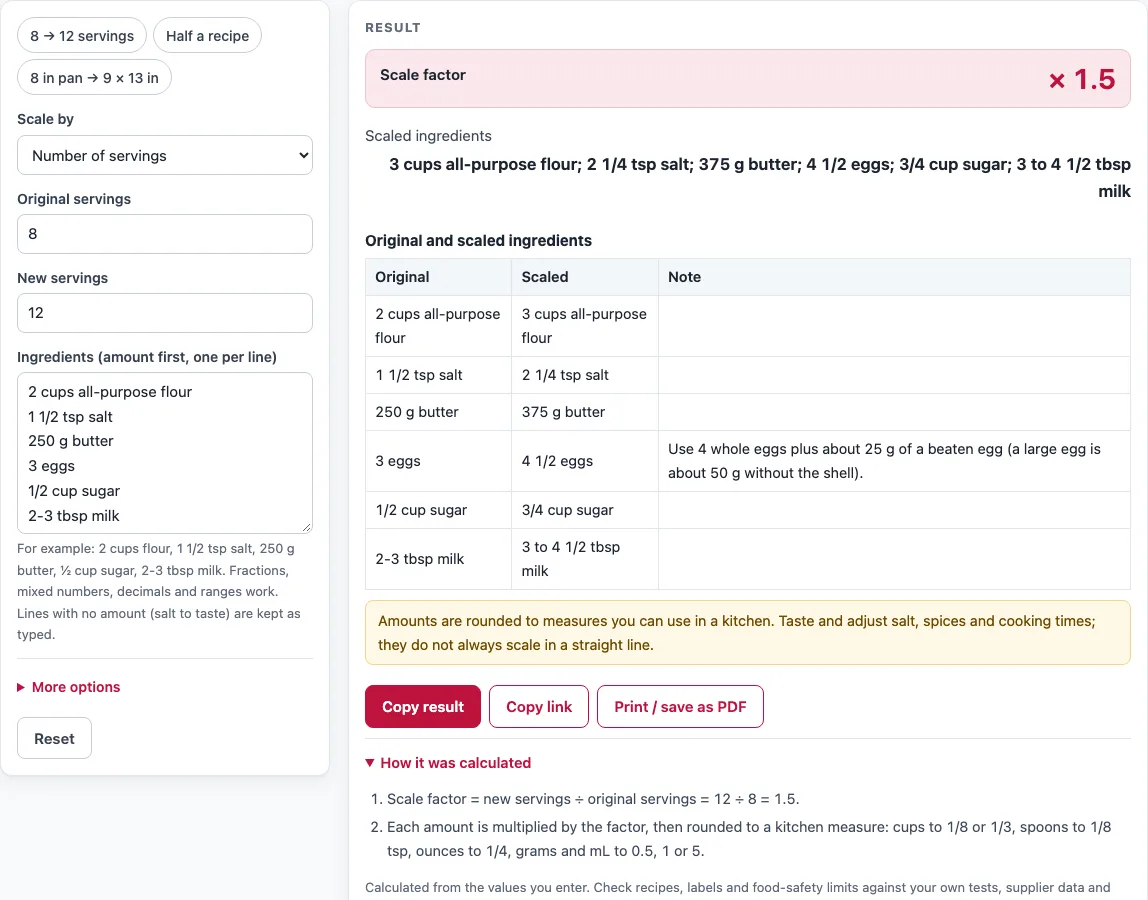
- Under “Scale by”, choose “Number of servings”, “A factor (× 2, × 0.5 …)”, or “Pan size”.
- For servings, type the number in “Original servings” and the number in “New servings”. For a factor, type a number in “Scale factor”: 2 doubles the recipe, 0.5 halves it.
- For pan size, choose “Original pan shape” and “New pan shape” (Round, Square or Rectangular). Then enter the size of each pan in inches or cm. Measure across the inside of the pan. For a rectangular pan, also enter the width.
- In “Ingredients (amount first, one per line)”, type one ingredient per line, such as “2 cups flour” or “1 1/2 tsp salt”. Fractions, decimals and ranges work. Lines without an amount are kept as typed.
- Under “More options”, choose “Units in the scaled recipe”: keep your units, or convert US units to metric.
- Read the result rows, “Scale factor” and “Scaled ingredients”. Check “How it was calculated” and any warnings before you use the numbers.
You can load one of the example buttons above the form (“8 → 12 servings”, “Half a recipe”, or “8 in pan → 9 × 13 in”) to see how the tool works. “Reset” restores the default values.
Under the result, “Copy result” copies the result lines, and “Copy link” copies a page address that holds all your inputs, so the same calculation reopens later. “Print / save as PDF” prints the inputs, results, calculation steps and the date.
How do I scale a recipe?
To scale a recipe, divide the new number of servings by the original number, then multiply every amount by that result. This number is the scale factor. A recipe for 4 that is scaled to 6 uses a factor of 6 ÷ 4 = 1.5, so 2 cups becomes 3 cups.
The tool then rounds each amount to a measure you can use in a kitchen. Cups are rounded to 1/8 or 1/3, spoons to 1/8 tsp, ounces to 1/4, and grams and mL to 0.5, 1 or 5. For example, a recipe for 24 scaled to 60 has a factor of 2.5, so 1 1/2 cups of sugar becomes 3 3/4 cups.
Scaling by multiplication suits many ingredients, but not everything. Salt, spices, leavening and cooking times often need adjusting by taste and testing when a recipe changes a lot.
How do I convert a recipe to a different pan size?
To convert a recipe to a different pan, compare the areas of the two pans, as long as both have the same depth. The scale factor is the new pan’s area divided by the original pan’s area. A 9 in round pan has an area of about 63.6 in², and a 9 × 13 in pan has an area of 117 in². The factor for changing from the round pan to the larger one is 117 ÷ 63.6, or about 1.84.
The tool calculates these areas from the shape and size you enter, then applies the factor to each amount. Because the calculation assumes equal depth, a pan that is deeper or shallower will change the result. Baking time also changes with pan size, so check doneness early.
Sources
- NIST Handbook 44, Appendix C — exact US customary units (1 lb = 453.59237 g, 1 fl oz = 29.5735295625 mL, cup = 8 fl oz)
- USDA FoodData Central, egg, whole, raw — one large egg is about 50 g without the shell
Worked examples
| Input | Result |
|---|---|
| 6 ingredients, 8 → 12 servings | × 1.5: 2 cups all-purpose flour → 3 cups all-purpose flour |
| 4 ingredients, factor 0.5 | × 0.5: 1 cup milk → 1/2 cup milk |
| 5 ingredients, 24 → 60 servings | × 2.5: 1 1/2 cups sugar → 3 3/4 cups sugar |
| 4 ingredients, new pan size | × 1.828: 1 cup sugar → 1 7/8 cups sugar |
| 4 ingredients, factor 2 | × 2: 500 g bread flour → 1 kg bread flour |
| 4 ingredients, factor 1 | × 1: 1 cup milk → 235 mL milk |
Calculated by the tool above with these values.
Frequently asked questions
Is the calculator free, and is anything I type uploaded?
Yes, the calculator is free and needs no sign-up. It runs entirely in your browser, and nothing you type is uploaded.
Can I use the results in commercial work such as quotes and bids?
Yes. You may use the numbers, steps and printouts in any work, including product labels, packaging, menus, recipes and costing sheets. No attribution is needed. You are responsible for checking your inputs, food safety and the rules that apply to you.
Is this the same as a batch size calculator?
Yes, it can be used as one. Enter the original servings and the number you want to make, or set a scale factor, and the tool gives you the adjusted amounts for the larger or smaller batch.
Why does the tool warn me about salt, spices and baking time?
Some ingredients and cooking times do not change in a straight line when a recipe is scaled. Salt, spices, leavening and baking time often need tasting or testing, especially when the factor is large. The warnings are there to remind you to check these.
Do I need to convert my units before I scale?
No. You can keep the units you typed, or choose to convert US units to metric. The tool converts cups, spoons and fl oz to mL, and oz and lb to g. It never converts volume to grams, because that needs the density of each ingredient.
Related tools
- Food cost calculator: use it to work out what each portion costs once your recipe is scaled.
- Recipe cost calculator: use it to total the cost of a full recipe for a costing sheet.
- Nutrition label generator: use it to create a nutrition label for a product you make in a new batch size.
- Baker’s percentage calculator: use it to compare dough formulas by ingredient weight relative to flour.
- Sourdough calculator: use it to plan sourdough quantities for a different number of loaves.
- Pizza dough calculator: use it to work out dough amounts for a different number of pizzas.
- All calculators: use it to browse every tool on the site.