Supplement Facts Label Generator
List each dietary ingredient with its amount per serving and get a Supplement Facts panel with % Daily Values.
The Supplement Facts label generator is a free tool that draws a Supplement Facts panel in the format of 21 CFR 101.36 from a list of dietary ingredients and their amounts per serving. It runs in your browser, needs no sign-up, and uploads nothing.
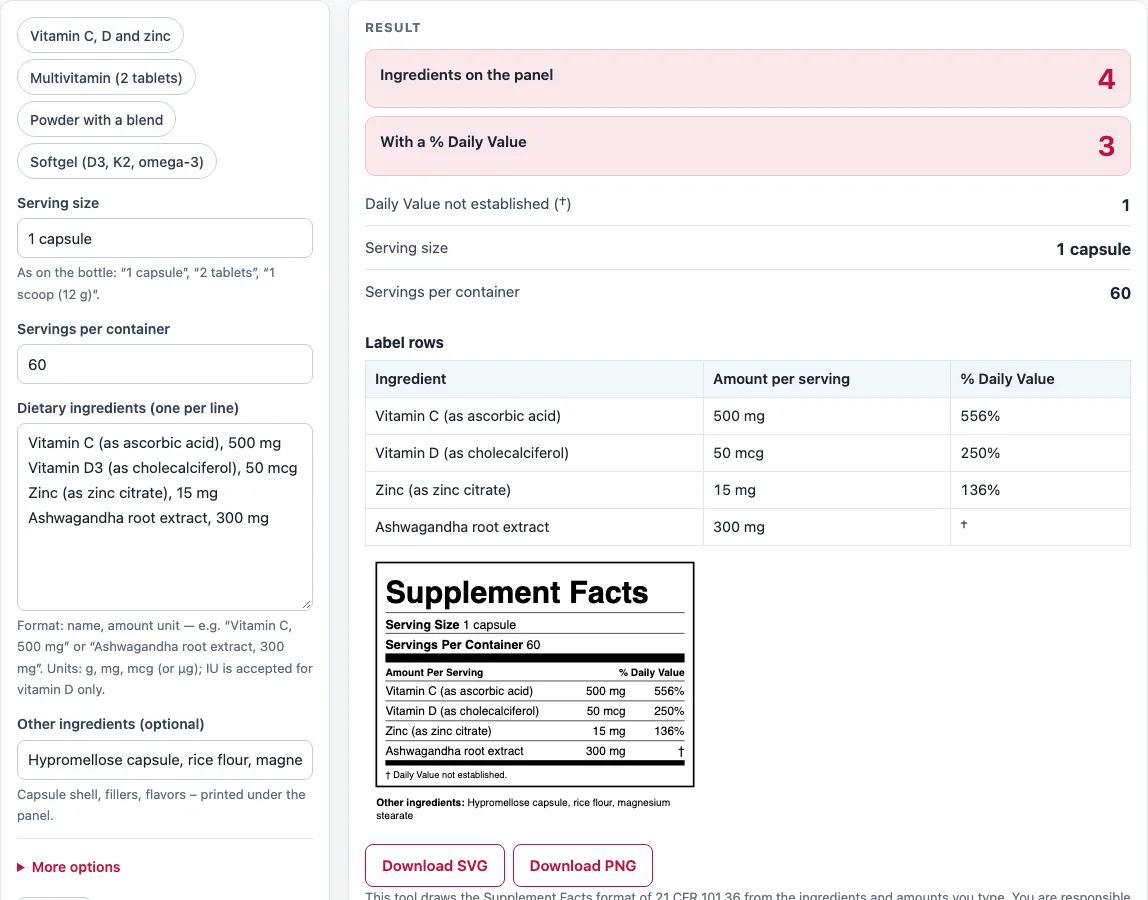
Enter the serving size as printed on the bottle, the servings per container, and one ingredient per line, such as “Vitamin C, 500 mg”. The tool works out the % Daily Value where one exists and marks the rest with a dagger (†). You can add a proprietary blend and other ingredients, then download the label as SVG or PNG. The panel lists vitamins, minerals and other dietary ingredients only, so it has no calories or macronutrient rows and no “2,000 calorie” footnote. You are responsible for accurate amounts and the rules for your product; the FDA does not review or approve the label.
How to use the Supplement Facts label generator
- Click one of the example buttons (Vitamin C, D and zinc, Multivitamin (2 tablets), Powder with a blend, or Softgel (D3, K2, omega-3)), or start from the default values.
- In Serving size, type the serving exactly as it appears on the bottle, such as “1 capsule”, “2 tablets” or “1 scoop (12 g)”.
- In Servings per container, type the number of servings in one container.
- In Dietary ingredients (one per line), type each ingredient as name, amount and unit, for example “Vitamin C, 500 mg”.
- In Other ingredients (optional), type capsule shells, fillers or flavors. They print under the panel.
- If you have a blend, open More options. Enter the Proprietary blend name, its total weight (mg, g or µg) and the Blend components in descending order of weight, separated by commas.
- Read any warning shown with the result and correct the flagged line.
- Check the result rows, the “Label rows” table and How it was calculated, which shows each %DV step with your numbers.
Put the amount per serving on each line, and add the unit after the number. Use the name as you want it printed, with a source in brackets if you like, such as “Zinc (as zinc citrate), 15 mg”. Download the label as SVG or PNG. Copy result, Copy link, Print / save as PDF and Reset work as named.
How do I make a Supplement Facts label?
Write one dietary ingredient per line, with its name, amount per serving and unit, and the tool builds the panel from those lines. Make sure the serving size you enter matches the amount you type, because each amount is treated as the amount per serving.
For each nutrient with an FDA Daily Value, the % Daily Value is the amount per serving divided by that Daily Value, rounded to the nearest whole percent, or shown as “<1%” for a tiny share. The Daily Values are those for adults and children 4 years and older (21 CFR 101.9(c)(8)(iv), used by 101.36). For example, 500 mg of vitamin C gives 500 mg ÷ 90 mg = 556%. Vitamin D at 50 mcg gives 50 mcg ÷ 20 mcg = 250%. Zinc citrate at 15 mg gives 15 mg ÷ 11 mg = 136%.
Ingredients with no established Daily Value, such as ashwagandha root extract, get no percentage. They are marked † with the footnote “Daily Value not established.” Rows with a Daily Value come first, in the order of the Daily Value table. The rest follow by descending weight.
Units matter. Use g, mg, or mcg (or µg). IU is accepted for vitamin D only, where the tool converts 40 IU to 1 mcg. For other nutrients, the tool warns that IU cannot be converted to a %DV because that depends on the chemical form, so enter mcg or mg. Enter vitamin A as mcg RAE, and folic acid from supplements as mcg DFE, where 1 mcg of folic acid from supplements equals 1.7 mcg DFE.
A proprietary blend appears in bold with its total weight, marked † because it has no Daily Value, and its components are listed beneath in the order you typed them. Individual component amounts are not shown. A blend needs a name and a total weight.
What is the difference between Supplement Facts and Nutrition Facts?
Supplement Facts is the panel used for dietary supplements under 21 CFR 101.36, and Nutrition Facts is the panel used for conventional foods. Both use the same Daily Value table, but the Supplement Facts panel lists dietary ingredients such as vitamins, minerals, herbs and botanical extracts.
A Supplement Facts panel also has space for a proprietary blend and a separate list of other ingredients, such as capsule shells and fillers, printed beneath it. A food panel does not use these sections. If you are labeling a food product instead, use the nutrition label generator linked below.
Sources
- 21 CFR 101.36 (eCFR) — Supplement Facts format
- 21 CFR 101.9 (eCFR) — Daily Values (c)(8)(iv) and (c)(9), rounding of calories, fat, sodium, carbohydrate and %DV
- FDA guidance on declaring quantitative amounts of vitamins and minerals (2019) — rounding increments for vitamin D, calcium, iron and potassium
- FDA guidance, Converting Units of Measure for Folate, Niacin, and Vitamins A, D, and E (2019) — 1 IU vitamin D = 0.025 mcg
Worked examples
| Input | Result |
|---|---|
| 1 capsule, servings per container: 60 | 4 ingredients listed, 3 with a %DV; first row Vitamin C (as ascorbic acid) 500 mg = 556% |
| 2 tablets, servings per container: 45 | 11 ingredients listed, 11 with a %DV; first row Vitamin A (as retinyl acetate) 900 mcg RAE = 100% |
| 1 scoop (12 g), servings per container: 30 | 5 ingredients listed, 2 with a %DV; first row Vitamin C 250 mg = 278% |
| 1 softgel, servings per container: 90 | 3 ingredients listed, 2 with a %DV; first row Vitamin D (as cholecalciferol) 125 mcg = 625% |
| 1 capsule, servings per container: 120 | 2 ingredients listed, 2 with a %DV; first row Magnesium (as magnesium glycinate) 200 mg = 48% |
Calculated by the tool above with these values.
Frequently asked questions
Is the supplement facts label generator free, and is anything I type uploaded?
Yes, the tool is free, needs no sign-up, and runs entirely in your browser. Nothing you type is uploaded.
Can I use the results in commercial work?
Yes. The numbers, steps, printouts and labels can be used in any work, including commercial work such as product labels, packaging, menus, recipes and costing sheets. No attribution is needed.
Why does an ingredient show a † instead of a percentage?
The dagger means the ingredient has no established Daily Value, so the tool cannot calculate a %DV for it. The footnote “Daily Value not established.” prints with it.
Can I enter vitamin D in IU?
Yes, IU is accepted for vitamin D only. For any other nutrient, enter the amount in g, mg, or mcg, because an IU value cannot be converted to a %DV without knowing the chemical form.
Why did my proprietary blend line disappear?
The blend line is left out when a blend amount or components are typed without a blend name. Enter a name in Proprietary blend name, and the blend will appear. If the blend has a name but no components, the tool will warn you to list them in descending order of weight.
Does the tool check that my label meets the rules?
No. The panel follows the FDA format, but results come only from the values you enter. The tool does not check safe levels or claims, and the FDA does not review or approve the label. You are responsible for accurate amounts and for the rules that apply to your product.
Related tools
- Nutrition label generator: Use this when you are labeling a conventional food rather than a dietary supplement.
- Food cost calculator: Use this to work out what each ingredient costs per serving or per product.
- Recipe cost calculator: Use this to total the cost of a batch recipe before you price it.
- All calculators: Use this to browse every calculator on the site.